

Choosing the right platform for your business website involves more than deciding how it should look. Website speed, search engine visibility, security, scalability and content management all influence how effectively a website supports business growth. Two platforms that frequently come up in this conversation are Webflow and WordPress. Both offer powerful website development capabilities, but they approach design, development and performance differently.
The Webflow vs WordPress discussion is particularly relevant for businesses planning a new website or considering a platform migration. While WordPress offers an extensive ecosystem of plugins and customisation options, Webflow brings visual development, integrated hosting and design flexibility into a more connected environment. At Wings Design, we look beyond platform popularity to understand which technology best supports a business’s digital objectives.
1. Webflow vs WordPress: Understanding the Key Differences
Before comparing performance, it is important to understand how these platforms work. WordPress is an open-source content management system that offers extensive flexibility through themes, plugins and custom development. Businesses can build everything from corporate websites and blogs to complex ecommerce platforms using its ecosystem.
Webflow takes a different approach by combining visual website design, development and content management within one platform. It allows designers and developers to create custom websites with greater visual control while managing hosting and CMS functionality within the same environment.
The main difference lies in how much control businesses want over their technical infrastructure and how they prefer to manage their websites. WordPress provides greater freedom to customise the underlying environment, while Webflow offers a more integrated approach to website design and management.

Businesses exploring their options can also read our guide on essential website development tools and platforms to understand how different technologies contribute to building a modern website.
2. Website Speed and Performance
Website speed directly influences user experience. Visitors expect pages to load quickly, navigation to feel responsive and content to appear without unnecessary delays. A slow website can create friction, affect engagement and reduce the likelihood of visitors completing important actions.
Webflow provides managed hosting infrastructure and content delivery capabilities, giving businesses a more integrated foundation for website performance. Its visual development environment also allows teams to manage layouts, interactions and content without relying on multiple development plugins.
WordPress performance depends more heavily on the hosting provider, theme quality, plugin selection, caching configuration and overall development approach. A well-optimised WordPress website can deliver excellent performance, but poorly configured plugins, oversized media files and inefficient themes can introduce unnecessary overhead.
Which performs better?
Webflow can make performance management more straightforward because hosting and several infrastructure components are integrated. WordPress can achieve equally strong results when supported by suitable hosting, caching, image optimisation and disciplined development practices. Neither platform guarantees speed automatically.

For a deeper understanding of performance-related issues, explore our article on why slow product pages kill revenue.
3. SEO Capabilities and Search Engine Visibility
A website should not only look impressive but also be discoverable. Search engine optimisation is an important consideration when selecting a CMS because the platform influences how teams manage page structures, metadata, content and technical configurations.
Webflow provides built-in SEO controls for page titles, meta descriptions, image alt text, redirects, canonical tags and other essential settings. Its visual development environment also supports structured website layouts and responsive design, helping businesses build search-friendly digital experiences.
WordPress offers extensive SEO flexibility through plugins and custom configurations. Businesses can manage metadata, XML sitemaps, schema markup, redirects and other optimisation requirements using dedicated tools. However, maintaining these elements may require additional plugins and ongoing technical management.
Both platforms can support effective SEO strategies. The deciding factor is how well the website is structured, developed and maintained. Content quality, internal linking, mobile usability, technical implementation and page experience remain important regardless of the CMS.
4. Design Flexibility and User Experience
Your website represents your brand across digital touchpoints. Its design should communicate your positioning, establish credibility and make it easy for visitors to understand your offerings.
Webflow offers strong visual design control, allowing designers to build custom layouts, responsive interfaces, animations and interactions without being restricted to conventional themes. This makes it particularly suitable for businesses looking for distinctive corporate websites, premium brand experiences and visually engaging digital platforms.
WordPress also supports extensive design flexibility through themes, page builders and custom development. However, the final experience often depends on the theme architecture, builder and additional tools being used. Maintaining consistency across different components may require more coordination.
For businesses that prioritise custom visual experiences and design precision, Webflow provides a compelling development environment. WordPress remains a strong option when extensive custom functionality and an established plugin ecosystem are important requirements.
Good design also needs to consider how people interact with a website.
5. Security and Website Maintenance
Website security is an essential part of long-term digital performance. Vulnerabilities, outdated software and poorly maintained integrations can expose business websites to unnecessary risks.
Webflow manages several infrastructure-related responsibilities, including hosting and platform-level updates. This reduces the amount of routine server and CMS maintenance required from website owners. Businesses still need to manage access permissions, integrations, forms and third-party services responsibly.
WordPress requires a more active maintenance approach. Website owners need to monitor core updates, plugin versions, themes, backups, hosting security and other technical dependencies. Managed WordPress hosting and reliable maintenance practices can significantly simplify these responsibilities.
For businesses without dedicated technical teams, Webflow’s managed environment can reduce ongoing maintenance requirements. WordPress offers more infrastructure control but generally requires greater attention to maintenance.
6. Scalability: Which Platform Supports Business Growth?
A website should be built around where a business is heading, not just what it needs today. As organisations expand, their websites may need additional landing pages, new service sections, content libraries, integrations and more sophisticated user journeys.
Webflow supports scalable website structures through its CMS, reusable components and structured content collections. It can be suitable for growing businesses, corporate websites and marketing-led organisations that need flexibility without constantly depending on developers for content changes.
WordPress offers a broad ecosystem for businesses requiring specialised functionality, complex integrations and extensive custom development. Its flexibility makes it suitable for a wide range of website requirements, although scaling effectively requires careful decisions around hosting, architecture and maintenance.
The right choice depends on the complexity of the business model, content requirements, integrations and future development plans.
If your organisation is planning a larger digital transformation, our guide to website development in India covers important considerations before investing in a new business website.
7. Content Management and Ease of Use
A business website needs to remain relevant after launch. Marketing teams should be able to update content, publish articles, introduce new services and manage landing pages without unnecessary development delays.
Webflow CMS allows teams to organise structured content and manage website updates through its editing capabilities. With a well-planned CMS architecture, businesses can maintain consistency while publishing new content.
WordPress has a mature content management ecosystem, particularly for blogs, editorial websites and content-heavy platforms. Its familiar publishing interface and extensive plugin library make it a flexible choice for teams managing large volumes of content.
Both platforms support independent content management. The experience depends on how the website is structured and how well the CMS is configured during development.
8. Webflow vs WordPress: A Feature-by-Feature Comparison
| Feature | Webflow | WordPress |
|---|---|---|
| Website speed | Managed infrastructure and optimisation capabilities | Depends on hosting and implementation |
| SEO | Built-in SEO controls | Plugins and custom configurations |
| Design flexibility | Extensive visual design control | Themes, builders and custom development |
| Security | Managed platform infrastructure | Requires ongoing maintenance |
| CMS | Structured visual CMS | Flexible content management system |
| Hosting | Integrated managed hosting | Hosting selected separately |
| Scalability | Strong for marketing and content-led websites | Broad flexibility for custom requirements |
| Maintenance | Lower infrastructure maintenance | More hands-on maintenance |
| Customisation | Visual development and integrations | Plugins and custom code |
Neither platform is universally better. The right choice depends on the website’s purpose, technical requirements, business goals and long-term maintenance capabilities.
9. When Should You Choose Webflow Over WordPress?
Webflow is worth considering when your business prioritises design flexibility, a streamlined content management experience and managed website infrastructure.
It can be particularly suitable for:
- Corporate websites: Businesses looking for a professional digital presence with custom layouts and structured content.
- Growing organisations: Companies that need to expand their website without constantly rebuilding its foundation.
- Marketing-led businesses: Teams that frequently publish content, launch campaigns and update landing pages.
- Design-focused brands: Businesses that want their digital presence to reflect a distinctive visual identity.
- Enterprise websites: Organisations seeking a managed platform for sophisticated marketing and corporate websites, subject to their CMS, integration and governance requirements.
WordPress may be more suitable when a project requires specialised plugins, extensive backend customisation, specific third-party integrations or functionality that is better supported by its ecosystem.
10. Why Professional Webflow Development Matters
Choosing Webflow is only one part of building a successful website. The quality of its design, information architecture, development and technical implementation ultimately determines how well it performs.
A professionally developed Webflow website should combine responsive design, clean development practices, structured CMS collections, optimised media, intuitive navigation and SEO-friendly architecture. It should also reflect the business’s brand positioning rather than relying on generic templates.
At Wings Design, we bring together UX strategy, visual design and Webflow development to create websites that support business objectives. As a Webflow Certified Partner, we focus on building digital experiences that balance brand expression, usability, performance and scalability.
Explore our Webflow Design Agency page to learn more about our approach to creating custom Webflow websites for growing businesses and global organisations.
11. Real-World Website Development: Exploring Wings’ Work
The effectiveness of a website platform becomes clearer when you see how it supports actual business requirements. At Wings, our website development projects bring together strategy, user experience, visual design and technology.
DCC: Building a Scalable Digital Platform
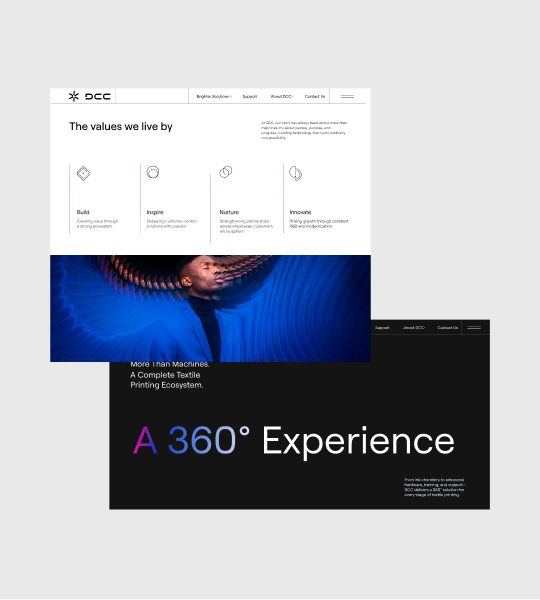
DCC required a digital platform capable of presenting a complex global printing ecosystem across an extensive website structure. The project involved information architecture, UX/UI design and Webflow development, demonstrating how a well-planned CMS and structured user journeys can support complex B2B communication.
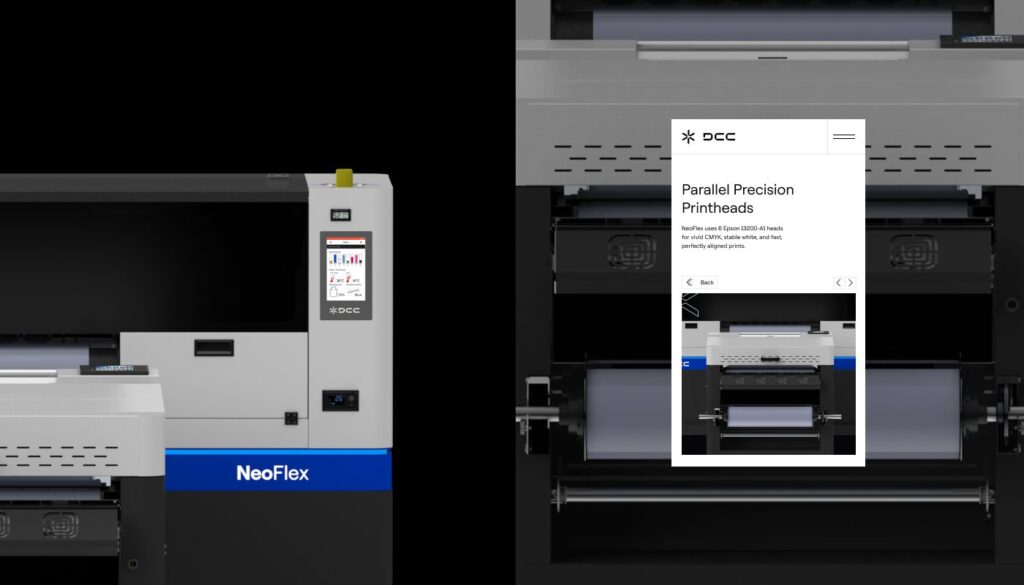
Explore Wings Design’s website development work for DCC.
Vedic City: Creating a Cohesive Digital Experience
A destination-led real estate brand needs more than attractive visuals. It needs a digital experience that communicates its proposition, presents information clearly and creates a cohesive journey for visitors. The Vedic City website project demonstrates the importance of combining brand understanding with thoughtful website design.

Explore Wings Design’s website development work for Vedic City.
These projects highlight an important principle: the success of a website depends on how effectively design, content and technology work together.
Conclusion: Choose a Platform That Works for Your Business
The Webflow vs WordPress decision should not be based on popularity alone. Both platforms offer powerful capabilities, but their suitability depends on your business requirements, technical resources, content needs and long-term digital strategy.
Webflow offers an integrated approach to visual design, CMS management and hosting, making it a compelling choice for businesses seeking custom digital experiences with less infrastructure maintenance. WordPress provides an extensive ecosystem and flexibility for organisations with specialised functionality and custom development requirements.
Ultimately, the best platform is the one that supports your business beyond launch day. A well-designed, properly developed and strategically optimised website can strengthen your brand, improve user experience and create better opportunities for growth.
Looking to build or migrate to Webflow?
Wings Design brings strategy, UI/UX design and Webflow development together to create high-performing digital experiences for ambitious businesses.
Get in touch with Wings Design to discuss your next website project.