


AI-PoweredEcommerce Website Builders: Faster, Smarter Website Creation
What Is an AI Ecommerce Website Builder?
An AI ecommerce website builder uses generative AI and structured design rules to launch fully functional, highly optimized online stores in minutes. Rather than starting with blank design boards or rigid templates, you describe your business model, product line, and brand tone. The AI then configures the database, designs matching layouts, writes initial product copy, and sets up a working checkout.
Benefits of AI Website Builders for Businesses
- Rapid Deployment: Go from concept to a live, testable storefront in a single afternoon instead of waiting weeks.
- Cost Efficiency: Significantly reduces the initial setup budget, allowing bootstrapped startups to enter the market.
- Built-in Best Practices: Pages are automatically structured for standard search optimization (SEO) and user conversions.
Best Use Cases for AI-Driven Website Development
- Testing New Products: Quickly spin up landing pages to validate consumer demand before investing in heavy stock.
- Localized Campaign Pages: Build targeted, highly specific landing pages for local ads or seasonal promotions.
- Niche Storefronts: Run separate, dedicated micro-stores tailored to distinct audiences from a shared product inventory.

Explore the Web development process behind the Vedic city.
AI Chatbots Become Intelligent Customer Experience Hubs
How AI Chatbots Are Evolving in 2026
Clunky, rule-based chatbots that only regurgitate generic FAQs are a thing of the past. Modern chatbots rely on deep Natural Language Processing (NLP). They function as actual digital assistants capable of understanding context, sentiment, and complex multi-turn conversations.
AI Chatbots for Sales, Support, and Personalization
Instead of just deflecting support tickets, these bots act as active sales agents. They can look up real-time inventory, cross-sell products based on browsing behavior, resolve shipping issues, and even negotiate minor cart-abandonment discounts on the fly.
Integrating AI Chatbots with Business Workflows
The real power of a 2026 chatbot lies in its deep system integrations. When a customer asks a question, the bot interfaces directly with your CRM (Customer Relationship Management) system, your ERP (Enterprise Resource Planning) software, and your local fulfillment database to give exact, personalized answers.
WCAG 2.2 AA Compliance Becomes a Business Priority
What Is WCAG 2.2 AA?
The Web Content Accessibility Guidelines (WCAG) 2.2 are the international standards for making digital content accessible to people with disabilities. Conformance Level AA represents the standard legal benchmark that most commercial, educational, and public-sector websites must meet to avoid litigation and serve all users equally.
Key Accessibility Requirements for Modern Websites
WCAG 2.2 introduced several critical focus areas that developers must account for:
- Accessible Authentication (3.3.8): No cognitive tests (like complex puzzles or memorizing passwords) without alternative log-in methods.
- Consistent Help (3.2.6): Help features (such as contact forms, chat icons, or support links) must stay in the exact same spot across pages.
- Target Size Minimum (2.5.8): Interactive buttons and links must be at least 24 by 24 CSS pixels, or have enough physical space around them.
Common Accessibility Mistakes to Avoid
- Low Color Contrast: Backgrounds and text that blend together, making it impossible for low-vision users to read.
- Missing Image Alt Text: Omitting descriptions on images, which leaves screen-reader users in the dark.
- Keyboard Inoperability: Relying purely on hover or drag-and-drop elements without providing a way to navigate with a keyboard alone.

Explore the design system behind the EVOS.
ADA Guidelines 2026: Preparing Websites for Legal Compliance
Understanding the Latest ADA Expectations
Title II of the Americans with Disabilities Act (ADA) sets clear, strict timelines for public entities to achieve WCAG compliance. While private companies fall under Title III, US courts increasingly use WCAG 2.1/2.2 AA as the legal measure of whether a business website is genuinely open to the public.
How ADA Compliance Impacts Businesses
Ignoring digital accessibility is a major legal risk. Web accessibility lawsuits targeting retail, restaurant, and service business sites continue to rise. Beyond avoiding lawsuits, making your site accessible expands your potential market to include millions of users with permanent or temporary disabilities.
Best Practices for Accessible Web Design
- Use Semantic HTML: Structure your pages with proper native tags (<header>, <main>, <nav>, <button>) instead of styling generic <div> tags.
- Ensure Keyboard Focus: Make sure a clear, highly visible outline appears around whatever element a user tabs onto.
- Clean Code Practices: Keep code orderly so assistive software can easily scan and present the page content.
Progressive Web Apps (PWAs) Continue to Replace Traditional Apps
What Makes PWAs Popular in 2026?
A Progressive Web App (PWA) is a website built with modern web technologies that behaves exactly like a native mobile app. It runs directly inside the mobile browser, eliminating the need for users to search for, download, and install anything from an app store.
Benefits of Progressive Web Apps for Businesses
- No App Store Middlemen: Avoid the friction of app store approval processes and the standard 15-30% transaction fees.
- Single Codebase: Build and maintain one progressive website that scales automatically across desktop, iOS, and Android.
- Lightweight Performance: PWAs load faster, take up negligible device storage, and boost conversion rates.
Essential Features Every PWA Should Include
- Offline Functionality: Service workers cache critical assets so the app loads even with spotty internet.
- Push Notifications: Re-engage users with timely, relevant alerts sent straight to their device screens.
- Add to Home Screen (A2HS): A simple prompt that lets users install a permanent app icon on their device.

Explore the UX design process behind the Maverick AI.
Webhooks Power Real-Time Website Automation
What Are Webhooks?
Think of a Webhook as a reverse API. Instead of your website constantly asking another system, “Do you have new data yet?”, a webhook allows the external system to push that new data directly to your website the exact millisecond it happens.
Common Website Automation Use Cases
- Payment Settlement: Instantly unlocking access to a course the moment a Stripe payment clears.
- Instant CRM Syncing: Passing a hot lead from a website contact form to Salesforce within seconds.
- Inventory Updates: Instantly updating stock numbers across your store when an item sells on a partner marketplace.
Webhooks vs APIs: Understanding the Difference
| Feature | Webhooks (Event-Driven) | APIs (Request-Driven) |
| Action Method | Automatic push on an event | Manual pull by request |
| Efficiency | Extremely high (zero wasted calls) | Moderate (requires constant polling) |
| Best For | Real-time alerts, syncs, automation | Retrieving specific datasets on demand |
| Implementation | Set up a listener URL on your site | Write code to query external endpoints |
Low-Code and No-Code Platforms Accelerate Development
Why Businesses Are Choosing Low-Code Platforms
Modern business moves fast, and writing raw code for every minor page edit is too slow. Low-code and no-code platforms allow marketing and content teams to build landing pages, change promotion banners, and structure workflows visually, leaving developers free to focus on complex features and system architecture.
Benefits and Limitations
- Benefit: Drastically shortens development cycles and reduces operational dependencies.
- Benefit: Lowers development costs for standard web features.
- Limitation: Can lead to “vendor lock-in” where migrating off the platform is difficult.
- Limitation: Performance bloat if the platform injects unnecessary, heavy background code.
When Custom Development Is Still Necessary
If your project requires highly specialized databases, proprietary algorithms, strict security standards (like HIPPA/PCI compliance), or lightning-fast speed, custom coding remains the superior choice.

Explore the UX design process behind the Kind Energy.
Headless Ecommerce Delivers Faster, Flexible Shopping Experiences
What Is Headless Ecommerce?
In a traditional setup, your website’s front-end design is locked directly to your back-end database. Headless architecture splits them apart. Your content, inventory, and checkout live in a backend engine, while your front-end is a lightweight, custom-designed layer that communicates via secure APIs.
Benefits for Modern Online Stores
- Pure Design Freedom: Designers can build any user interface they want without database templates holding them back.
- Lightning Speed: The front-end serves static, pre-rendered files, which load near-instantly and keep bounce rates low.
- Omnichannel Selling: Use the exact same back-end data to power your main website, a mobile app, smart-mirror displays, and retail kiosks.
Is Headless Commerce Right for Your Business?
Headless is a great fit if you manage a high-volume store, have dedicated developers, and need to deliver unique, custom shopping experiences across multiple devices. If you are running a simple boutique with standard layouts, a traditional monolithic platform is usually much easier to manage.
Subscription Commerce Continues to Grow
Why Subscription Business Models Are Thriving
Subscriptions offer businesses predictable, recurring revenue while giving consumers convenience and savings. From physical curation boxes to digital content access, the subscription model builds deep, long-term relationships with customers.
Features Every Subscription Website Needs
- Flexible Customer Portal: Customers must be able to skip a delivery, swap products, or pause their subscription easily without needing to call support.
- Smart Dunning Management: Automated systems that gently retry failed credit cards and notify users before canceling their access.
- Tiered Pricing Options: Clear options for monthly, quarterly, or annual plans to lower the barrier to entry.
Improving Customer Retention Through Subscription Experiences
To keep subscribers from canceling, focus on personalizing their experience. Offer subscriber-only perks, let them easily customize their delivery frequency, and use intelligent recommendations to suggest relevant add-on items based on past orders.

Explore the Design process behind the Quint.
Edge Computing Improves Website Performance
What Is Edge Computing?
Traditionally, websites run on central servers in fixed locations. Edge computing distributes your site’s files and processes across hundreds of secure nodes located globally. When a user visits your site, the nearest node handles the request.
Benefits for Speed, Security, and Scalability
- Incredible Loading Speed: Serving files closer to the user reduces network latency to milliseconds.
- DDoS Protection: Large traffic spikes and malicious attacks are spread out and neutralized at the edge before they can crash your main server.
- Reliable Scalability: Your site can seamlessly handle sudden viral traffic surges without slowing down.
Edge Computing Use Cases for Modern Websites
Edge nodes do more than just cache files. They can run localized code, personalize page layouts based on regional data, compress images dynamically, and run security checks closer to the user.
Green Hosting Gains Momentum
What Is Green Web Hosting?
Data centers around the world consume enormous amounts of electricity. Green hosting resolves this by using renewable energy sources (like wind, solar, or hydro power) or purchasing verified carbon offsets to run and cool server infrastructure.
Environmental Benefits of Sustainable Hosting
Switching to a green host directly reduces your digital carbon footprint. Optimizing your site’s codebase so it requires less processing power also cuts down on the energy consumed by user devices.
How Green Hosting Can Improve Brand Reputation
Modern consumers care deeply about sustainability. Displaying a verified green hosting badge in your footer is a simple, clear way to show your brand values and build trust with environmentally conscious shoppers.

Explore the UX design process behind the Xenxo.
Browser AI Brings Intelligence Directly to the User
What Is Browser AI?
Historically, using AI on a website meant sending user data to a remote cloud server, waiting for a response, and sending it back. Browser AI changes this by running machine learning models directly inside the user’s browser, utilizing their own local hardware.
On-Device AI vs Cloud AI
The unlock for this trend is WebGPU, a modern web standard that gives browser scripts direct, high-speed access to the user’s graphic card. Coupled with lightweight on-device runtimes, websites can process image recognition, audio transcription, and interactive effects instantly without sending data to an external server.
Privacy, Performance, and User Experience Benefits
- Absolute Privacy: Sensitive user uploads never leave their device, which makes securing user data simple.
- Zero Network Latency: Real-time feedback occurs instantly because there are no server trips.
- No Server Costs: Your users’ own hardware does the heavy lifting, saving you money on cloud hosting.
Emerging Website Development Trends Worth Watching
As we look deeper into 2026, several other technologies are quickly moving from experimental concepts to industry standards:
- Voice Search Optimization (VSO): People are asking search engines conversational, long-tail questions rather than typing short keywords. Websites must use structured Schema Markup to help search engines extract direct answers easily.
- Privacy-First Web Development: With cookieless tracking becoming the norm and privacy laws tightening, websites must prioritize secure, first-party data collection methods.
- Serverless Architecture: Developers can run server code as independent, on-demand functions, which lowers costs and eliminates server maintenance.
- API-First Development: Building a website’s data structure and connections first, then designing the visual presentation. This makes it simple to plug your site’s backend into mobile apps, AI search, and internal business systems later on.
- Hyper-Personalized User Experiences: Using secure visitor data (like region, referral source, or past actions) to dynamically adjust content in real-time.
- Motion UI and Microinteractions: Smooth transitions and subtle, responsive animations that guide users through forms, buttons, and menus.
- AI-Generated Content with Human Oversight: Using AI to generate initial drafts of product listings and support documents, followed by human editing to maintain brand voice and accuracy.
- Zero-Trust Web Architecture: A security standard where every user, API call, and file access request is verified, preventing data breaches before they can start.
How Businesses Can Prepare for the Future of Website Development
01. Perform an Accessibility Audit: Check your current site for WCAG 2.2 Level AA compliance using automated tools and manual keyboard testing to identify and fix errors early.
02. Review Site Speed & Core Web Vitals: Ensure your site loads quickly on mobile, is edge-optimized, and uses clean code to maximize search rankings and conversion rates.
03. Adopt a Modular, API-Friendly Setup: Transition away from heavy, single-system architectures to modular systems that easily connect with CRM, ERP, and AI platforms.
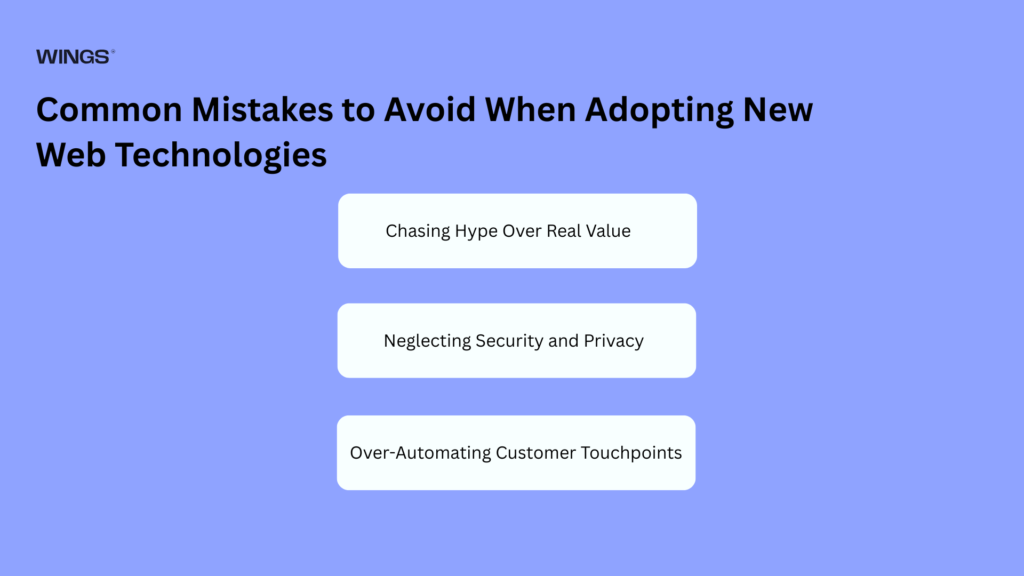
Common Mistakes to Avoid When Adopting New Web Technologies
- Chasing Hype Over Real Value: Implementing complex technologies (like headless architecture) when a simpler, traditional setup would serve your needs perfectly.
- Neglecting Security and Privacy: Expanding your site’s capabilities without setting up proper security checks, leaving your databases open to attacks.
- Over-Automating Customer Touchpoints: Using generic, automated systems for everything and losing the genuine human touch that builds customer loyalty.
Website Development Trends by Business Type
Ecommerce Websites
- Trend focus: Headless setups for multi-device selling, one-click checkout flows, and real-time subscription managers.
- Why it matters: Speed and ease of purchase directly impact sales.
SaaS Platforms
- Trend focus: Deep browser AI tools, fast real-time APIs, and highly secure zero-trust architectures.
- Why it matters: Protects user data and provides responsive, app-like experiences.
Corporate Websites
- Trend focus: Fully compliant WCAG 2.2 AA accessibility, data privacy setups, and green web hosting.
- Why it matters: Reduces legal risks, improves brand trust, and serves all users.
Healthcare & Finance Websites
- Trend focus: Zero-trust security protocols, clear accessible navigation, and offline PWA capabilities.
- Why it matters: Safeguards sensitive customer data and guarantees access under any conditions.
Small Business Websites
- Trend focus: Simple low-code builders, conversational voice search optimization, and lightweight PWAs.
- Why it matters: Budget-friendly setup, high performance, and easy search visibility.
Future Outlook: What Comes After 2026?
Looking past 2026, web development is moving toward completely dynamic digital spaces. We will see websites adapt and reconfigure their layout and text in real-time for each individual user based on how they interact with the page. Additionally, on-device browser AI will expand, shifting heavy computing away from servers and turning the web browser into a powerful, localized engine.
Conclusion: Building Future-Ready Websites in 2026
The websites that succeed in 2026 are fast, highly connected, secure, and accessible to every single user. By embracing on-device browser AI, headless structures, and WCAG accessibility standards, you can build a future-ready web presence that delivers a great experience for your customers and drives steady growth for your business.

Mugesh Kanna
Junior Web developer